Ant Download Manager is a Windows-based download tool built for speed and control. It accelerates large file downloads, supports video and audio grabbing, and handles resume smoothly. Ideal for users who want more reliability than browser downloads without complex setup.
Slow downloads are frustrating. Videos fail at 90 percent. Browsers struggle with big files. Many users rely on built-in download tools, only to face broken links, low speed, or zero resume support.
This is where Ant Download Manager comes in. It promises faster downloads, better video grabbing, and more control than a browser can offer. In this Ant Download Manager review, we tested it hands-on. No hype. No marketing talk. Just real use, real results, and clear pros and cons. If you are looking for the best download manager for Windows or a reliable video downloader tool, this review is for you.
Basic Overview
Ant Download Manager is a Windows-based download manager built for speed and control. It focuses on accelerating downloads and capturing online video and audio streams. Over the years, it has gained a steady user base among people who download frequently and expect reliability.
The tool is developed by a dedicated team with a long presence in the Windows utility space. It is mainly used by Windows users who download large files, stream videos, or want better control than browser downloads can offer.
Developer: Ant Download Manager is developed by AntGroup INC, known for maintaining and updating the software regularly.
Supported OS: It is designed for Windows. It works smoothly on modern Windows versions, including Windows 10 and Windows 11.
File Types: It supports general files, compressed archives, documents, audio files, and video streams from supported websites.
LicenseAnt Download Manager: It isavailable in both free and paid versions. The free version has limits, while the paid version unlocks full features.
Last Update: Actively updated, with improvements focused on browser support, stability, and video downloading.
What Ant Download Manager Promises
According to the official Ant Download Manager website, the tool claims to speed up downloads using advanced acceleration methods. It highlights strong browser integration with popular browsers for one-click downloads.
It also promises easy video and audio grabbing from supported streaming sites. Resume support and smart scheduling are promoted as core features for long downloads and unstable connections.
Now let’s see how well these claims hold up in real use.
Our Testing Methodology
We used Ant Download Manager the way most people do. Open the browser. Click download. Expect it to work.
We tested small PDFs, software installers, and large media files over 5 GB. Videos were grabbed from supported streaming sites that people commonly use for learning and entertainment. Each download was started, paused, and resumed to see how the tool behaves when things do not go perfectly.
We ran the tests on Chrome, Edge, and Firefox. The connection was a normal home network with natural speed drops. This helped us see whether Ant Download Manager stays reliable when the internet is not available.
Our Hands-On Testing Experience
Download Speed Comparison
This is where the tool feels satisfying. Files picked up speed quickly and stayed stable. Large downloads felt shorter than expected, which is always a good sign.
Resume After Interruption
We stopped downloads on purpose. Closed the app. Disconnected the network. When we came back, the progress was still there. No restart. No wasted time.
Video Formats Tested
Video downloads felt simple. Click. Choose quality. Done. MP4 and WebM worked without extra steps or confusion. It is perfectly fit to be your go-to video downloader tool.
Subtitle Handling
When subtitles were available, the option showed up naturally. It did not feel hidden or technical. It just worked when the source supported it.
Streaming Capture Reliability
The video grabber reacted fast. Streams were detected without hunting for links. This is the kind of feature you start trusting after a few successful tries.
CPU and RAM Usage
The system stayed responsive during downloads. Even with multiple files running, the PC did not slow down or heat up more than expected.
Features That Stood Out
Download Speed Acceleration
This is the feature you notice first. Ant Download Manager uses multiple connections to pull files faster, and it shows. Large downloads felt smoother and more consistent than browser downloads. During testing, a multi-gigabyte file finished sooner than expected without sudden speed drops. If you download big software files or media often, this alone makes a difference you can feel.
Smart Resume Support
Internet drops happen. Power cuts happen. What matters is how the download reacts. Ant Download Manager handled interruptions well and continued from the same point once the connection returned. We stopped downloads mid-way, closed the app, and resumed later without losing progress. This is a huge relief for anyone dealing with unstable connections.
Automatic Video Grabber
The video grabber feels natural to use. When a supported video page loads, download options appear without extra effort. There is no need to hunt for links or copy URLs. In testing, detection was quick and accurate. This makes offline viewing easy and stress-free for regular video watchers.
Video Quality Selection
Choosing video quality is simple and clear. Different resolutions appear before the download starts, so users stay in control. This helps when storage space or internet speed is limited. We switched between qualities without reloading or retrying. It feels smooth and practical.
Browser Integration
Ant Download Manager blends well with popular browsers. Downloads can be captured instantly with one click. You do not need to open the main app every time. During testing, browser prompts appeared fast and worked reliably. This is ideal for users who download directly from websites every day.
Batch Download Handling
Downloading multiple files at once feels organized. Files line up in a queue and run without manual effort. We added several files and let them download in the background. This saves time and reduces micromanagement. Students and office users will appreciate this flow.
Download Scheduler
The scheduler is simple but useful. It allows downloads to start later, which helps avoid peak internet hours. We scheduled large files overnight and woke up to completed downloads. This feature is especially useful for users with limited bandwidth or shared connections.
Simple and Focused Interface
The interface stays clean and readable. Important buttons are easy to spot. There is no clutter or confusion. Even first-time users can understand the layout quickly. It feels built for function rather than decoration.
Features That Need Improvement
Windows-Only Availability
Ant Download Manager is limited to Windows. This becomes an issue for users who switch between devices or use multiple platforms. Mac and Linux users are left out completely. For them, this is a clear deal-breaker. Some competitors offer broader platform support.
Restrictions in the Free Version
The free version works, but limits appear quickly. Advanced features are locked, and heavy users will notice the boundaries. Casual users may be fine, but frequent downloaders will feel pushed toward the paid version. Other tools offer more flexibility without upgrading.
Inconsistent Video Site Support
Not every video platform works perfectly. Some newer or less common sites are not detected. Users notice this when a video fails to appear in the grabber. It does not happen often, but when it does, it can be frustrating. Competitors tend to expand site support faster.
Outdated Visual Design
The interface works well, but looks old. It lacks modern visual polish. This becomes noticeable when compared to newer download managers. The issue is cosmetic, not functional, but design still affects user experience.
Advanced Settings Need Better Guidance
Powerful options exist, but they are not well-explained. New users may ignore features they could benefit from. This becomes clear when exploring deeper settings. A few clear hints or descriptions would improve usability. Some alternatives handle this better.
Performance and Stability Verdict
Speed Consistency
Ant Download Manager generally delivers stable download speeds once a connection is established. Users report that speed stays steady during large file downloads, especially when multi-connection mode is enabled. Results still depend on the source server and internet quality, which is expected for any download manager.
Crash Frequency
Crashes are not commonly reported during normal use. Most users experience stable day-to-day performance. Occasional issues tend to appear after browser updates or system changes, rather than during regular downloading.
Long Download Reliability
Long downloads usually complete without errors when the source supports resume. Many users rely on Ant Download Manager for large files because progress is saved correctly after pauses or brief disconnections. Failures are more often linked to server-side limits than the app itself.
Browser Extension Stability
The browser extension works reliably with supported browsers. Video detection and download prompts usually appear as expected. Temporary issues sometimes occur after browser updates, but updates from the developer typically resolve them.
What Real Users Say
Most users describe Ant Download Manager as a reliable and practical tool for everyday downloading. On platforms like Techjockey’s Ant Download Manager reviews, people often highlight its speed, smooth video grabbing, and easy setup. Many say it works well on common websites and feels lighter than heavier download managers, especially after moving to the paid version. Similar feedback appears on SaaSHub’s Ant Download Manager overview, where users value its performance-focused approach.
Community discussions add more balance. In threads shared on Reddit’s software community, users often mention that Ant detects video streams better than basic browser tools and can feel like a simpler alternative to older download managers. At the same time, some users point out that the interface looks dated and that support for newer or niche sites can be inconsistent.
Long-term feedback from forums like MalwareTips user discussions focuses on stability and safety. Users report clean installation and steady performance over time. Complaints usually target design choices and free version limits rather than crashes or security concerns. Overall, the community view suggests a tool that performs well within its scope, with clear strengths and realistic limitations.
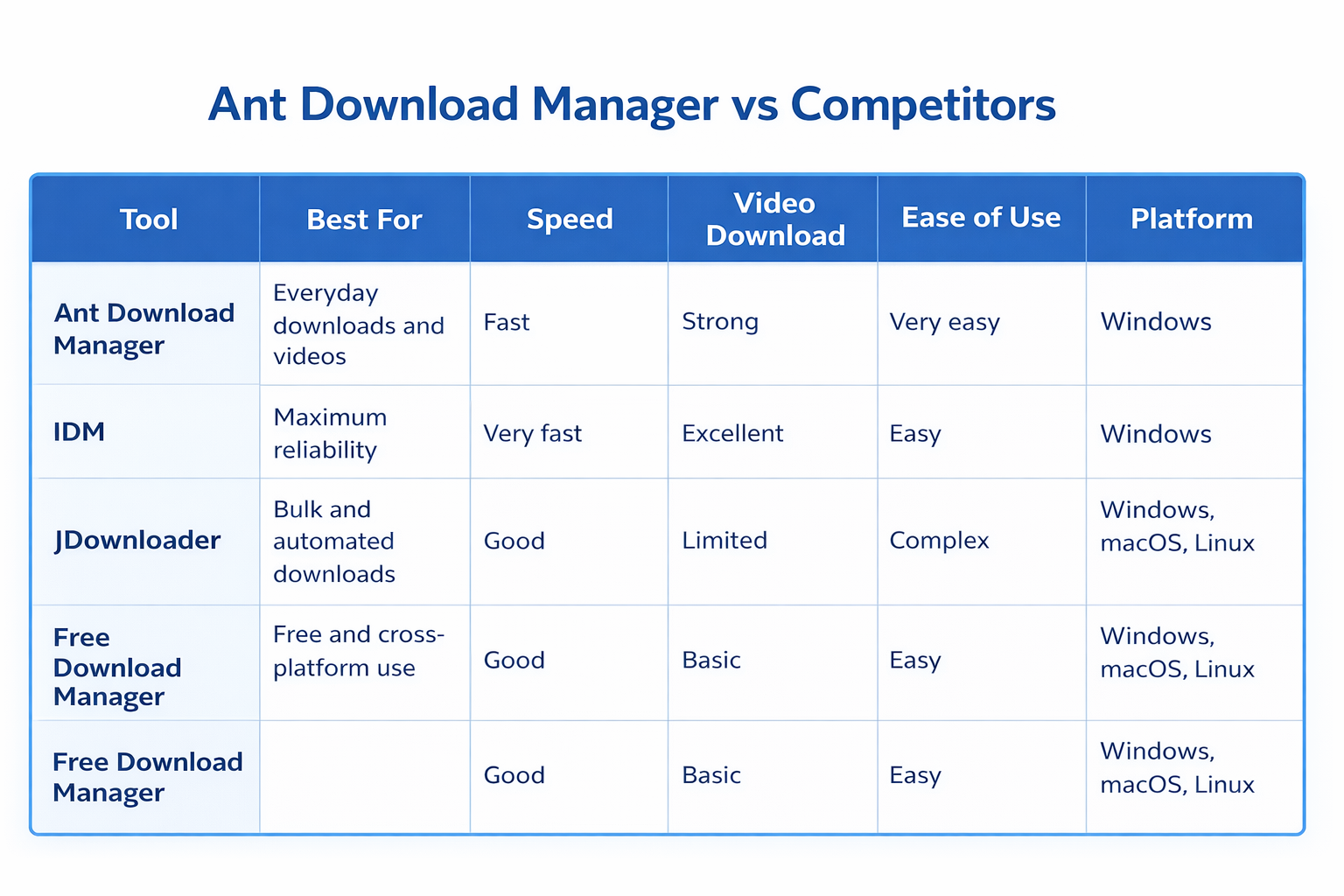
Ant Download Manager vs Competitors
Choosing a download manager often comes down to daily habits. Some users care most about speed. Others want video support or simple controls. Ant Download Manager sits in the middle of this space and competes directly with well-known tools. Here is how it performs when placed side by side with the most popular alternatives.
Ant Download Manager vs IDM
IDM is the benchmark for Windows download managers. It feels polished and widely supported. Ant Download Manager delivers similar speed in most cases and feels lighter during use. Video grabbing works well on Ant, especially for quick saves. IDM still leads in long-term reliability and wider website compatibility. Ant suits users who want a simpler experience. IDM fits those who want the most refined option available. More information is here: Ant Download Manager vs IDM.
Ant Download Manager vs JDownloader
JDownloader is built for advanced users. It focuses on automation and large link collections. Ant Download Manager takes a different path. It is easier to install, easier to use, and faster to understand. During testing, Ant felt smoother for everyday downloads. JDownloader is powerful but demanding. Ant is practical and user-friendly.
Ant Download Manager vs Free Download Manager
Free Download Manager appeals to users who want cross-platform support. It offers decent performance and a strong free tier. Ant Download Manager feels more focused on speed and video downloads. Large files and streams are handled better on Ant during use. Free Download Manager is flexible. Ant feels more responsive and purpose-built.
Pricing, License, and Free Version Limits
Ant Download Manager offers both free and paid access. This gives users a chance to test the tool before making a decision. The free version is suitable for light use and quick downloads. It helps users understand the interface and core behavior.
Limits become noticeable with frequent downloads or video use. Some advanced controls are restricted, and long sessions can feel interrupted. For casual users, this may not matter. For regular downloaders, the limits appear quickly.
The paid version removes these barriers. Download speed stays consistent, video features unlock fully, and the overall experience feels smoother. If downloading is part of your daily routine, upgrading saves time and reduces friction. Occasional users can stay on the free version without much trouble.
Safety, Privacy, and Legitimacy
Ant Download Manager feels safe when downloaded from a safe source like Fileion. Installation is straightforward and does not push unwanted software. During use, the app behaves as expected and stays focused on its core purpose.
Security checks did not raise concerns. No suspicious activity or hidden processes appeared during testing. The software runs cleanly in the background without triggering alerts.
The privacy policy is clear and accessible. It explains how basic usage data is handled in simple language. There are no aggressive ads inside the app and no bundled extras during setup. Overall, Ant Download Manager presents itself as a legitimate and trustworthy tool for everyday downloading.
Who Should Use Ant Download Manager?
Best for
Ant Download Manager is a strong choice for Windows users who download files and videos often. It suits students collecting study material, binge watchers saving videos for offline viewing, and users who handle large files regularly. If you want faster downloads, simple controls, and reliable resume support, this tool fits well into daily use.
Not ideal for
It may not be the right option for Mac or Linux users since it only supports Windows. Users who need advanced automation or bulk link management may also find it limited. If you prefer a completely free tool with no usage limits, other options may suit you better.
Bottom Line
Ant Download Manager delivers solid speed, reliable resume support, and smooth video downloading in a clean package. It feels lighter and easier than many competitors while still covering essential features. The free version works for light use, but the paid version offers a better experience for frequent downloaders. Overall, it is a dependable choice for Windows users who want control without complexity.
Our Final Thought
Ant Download Manager does not try to impress with flashy promises. It focuses on doing the basics well. Speed, stability, and ease of use remain its strongest points. If you download often and value reliability, it is worth considering. Download it from a trusted source, test the free version, and decide based on how it fits your daily needs.
Hi, I’m Ishrat, Junior Content Writer at Fileion. With a strong passion for tech and a background i...
1
Followers
0
Following
Software Content Writer
Hi, I’m Ishrat, Junior Content Writer at Fileion. With a strong passion for tech and a background in SEO, digital content, and web solutions, I craft stories that connect users to the tools they need. At Fileion, I turn complex topics into clear, helpful content, making tech feel simple and accessible for everyone. Let’s write something impactful!
Pricing
Ant Download Manager Official Plan Comparison
A breakdown of current pricing tiers based on information from the official website
to help you compare plans and find the best fit for your workflow. Last Updated: Jan 18, 2026 Note: We may earn a commission if you purchase through our links at no extra cost to you.
Free
Free version has no time limit but includes feature restrictions.